November 22, 2025
This week brings powerful new tools for developers working with MooseStack: iterate on SQL queries faster with the new moose query command, scale your production deployments with ClickHouse cluster support, and seamlessly create Fiveonefour hosting projects from GitHub repositories.
Highlights
- New:
moose queryCLI command for SQL exploration and code generation - New: ClickHouse cluster support for distributed deployments
- New: Database performance metrics visualization in Fiveonefour hosting project overview
moose query CLI command
Execute SQL queries against your ClickHouse database directly from the command line, with built-in validation, formatting, and code generation.
Why it matters: When building data pipelines, you often need to test SQL queries before adding them to your code. Previously, this meant switching between ClickHouse clients, manually escaping strings, and copying queries back and forth. The moose query command streamlines this workflow by letting you validate queries, see results immediately, and generate properly-formatted code ready to paste into your Python or TypeScript application.
CLI based querying (automatically set up to query your development ClickHouse instance):
# Execute a query and see JSON results
moose query "SELECT user_id, COUNT(*) as events FROM user_events GROUP BY user_id LIMIT 10"
{"user_id": "abc-1213", "count": 37}
Code generation for using the query in your code:
# Validate and format complex SQL for Python code
moose query --format-query python --prettify <<EOF
SELECT * FROM
logs WHERE message REGEXP '[0-9]{4}-[0-9]{2}-[0-9]{2}'
EOF

# Output: Properly escaped Python raw string ready to paste
r"""
SELECT
  *
FROM
  logs
WHERE
  message REGEXP '[0-9]{4}-[0-9]{2}-[0-9]{2}'
"""
PR: #2996, #2998
Documentation: CLI reference: moose query
ClickHouse cluster support
Configure distributed ClickHouse clusters in your moose.config.toml to deploy tables across multiple nodes with automatic ON CLUSTER DDL generation.
Why it matters: Production data applications need to scale beyond a single database node. ClickHouse clusters provide horizontal scaling and high availability, but managing distributed table creation, migrations, and operations is complex. MooseStack now handles this automatically—define your cluster topology once, and all table operations (CREATE, ALTER, DROP, migrations) will execute across all nodes.
# moose.config.toml[project]name = "analytics-production"language = "typescript" # Define your ClickHouse cluster[clickhouse.clusters.prod_cluster]nodes = [ { host = "clickhouse-1.example.com", port = 9000 }, { host = "clickhouse-2.example.com", port = 9000 }, { host = "clickhouse-3.example.com", port = 9000 }] # Tables automatically use ON CLUSTER syntax[clickhouse.tables.user_events]cluster = "prod_cluster"When you run migrations or create new tables, MooseStack automatically generates CREATE TABLE ... ON CLUSTER prod_cluster statements. This works with replicated engines, supports cluster-aware schema validation, and preserves cluster configuration across migrations. Both TypeScript and Python projects are fully supported.
PR: #2944
MooseStack Bug Fixes
- DateTime precision loss - preserve microseconds and nanoseconds (#3018)
- Table schema change detection for ORDER BY clauses (#3017)
moose seedcommand now supports cross-database table seeding (#3010)- Table settings handling with default values (#3012)
- Deterministic ordering in migration files (#3007)
- SQL parser SAMPLE BY clause extraction when TTL is present (#3011)
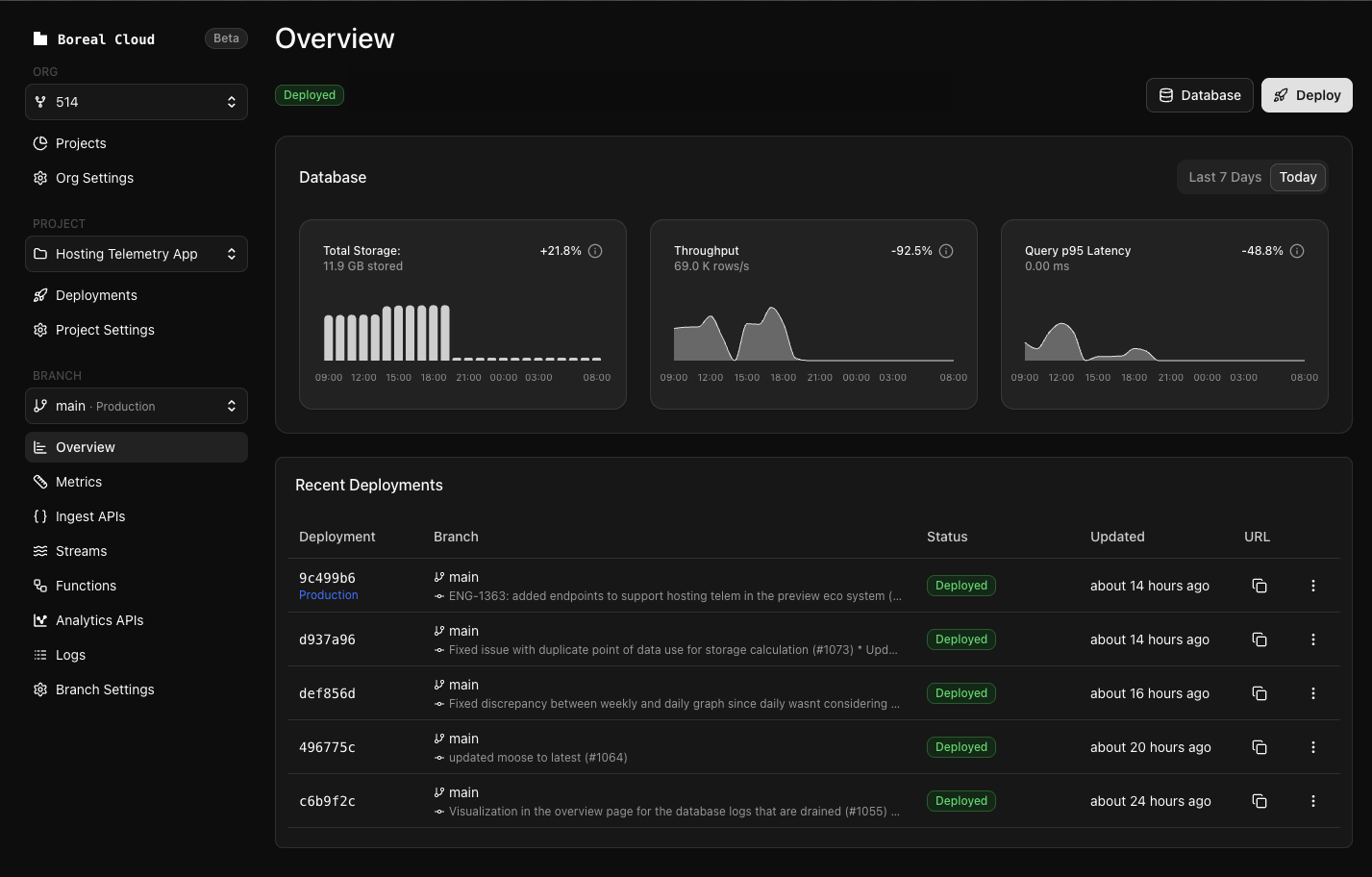
Fiveonefour: Database performance metrics visualization
View query latency (P95), throughput (rows/second), and storage usage directly in your project overview with weekly trends and 24-hour detailed views.
Why it matters: Understanding your database performance is critical for optimizing data pipelines and catching issues before they impact users. The new metrics visualization surfaces ClickHouse query log data directly in the Fiveonefour hosting dashboard, showing you how your database performance changes over time. Weekly and daily charts now display consistent data with percentage change indicators, making it easy to spot trends and diagnose slowdowns.
Other Fiveonefour Features and Improvements
- Redpanda cluster metrics – Added to monitoring dashboard
Fiveonefour Bug Fixes
- Branch selector – Now displays all branches with scrollable interface (removed 10-item limit)
- Deployment status timestamps – Now consistent across dashboard
- API v1 authentication middleware conflicts resolved
- Organization join redirect issue fixed
- Deployment reliability improved with proper await configuration