February 6, 2026
Highlights
- Breaking: Workflow API routes now require admin authentication
- New: Live logs view with structured logging and automatic fallback
- New: Streamlined project creation with one-click deployment
Fiveonefour
New Features
Live logs view with automatic fallback (@LucioFranco) New live logs view showing the last 15 minutes of logs with real-time updates every second. Automatically falls back from structured logs to legacy parsed logs when needed for compatibility during the transition.
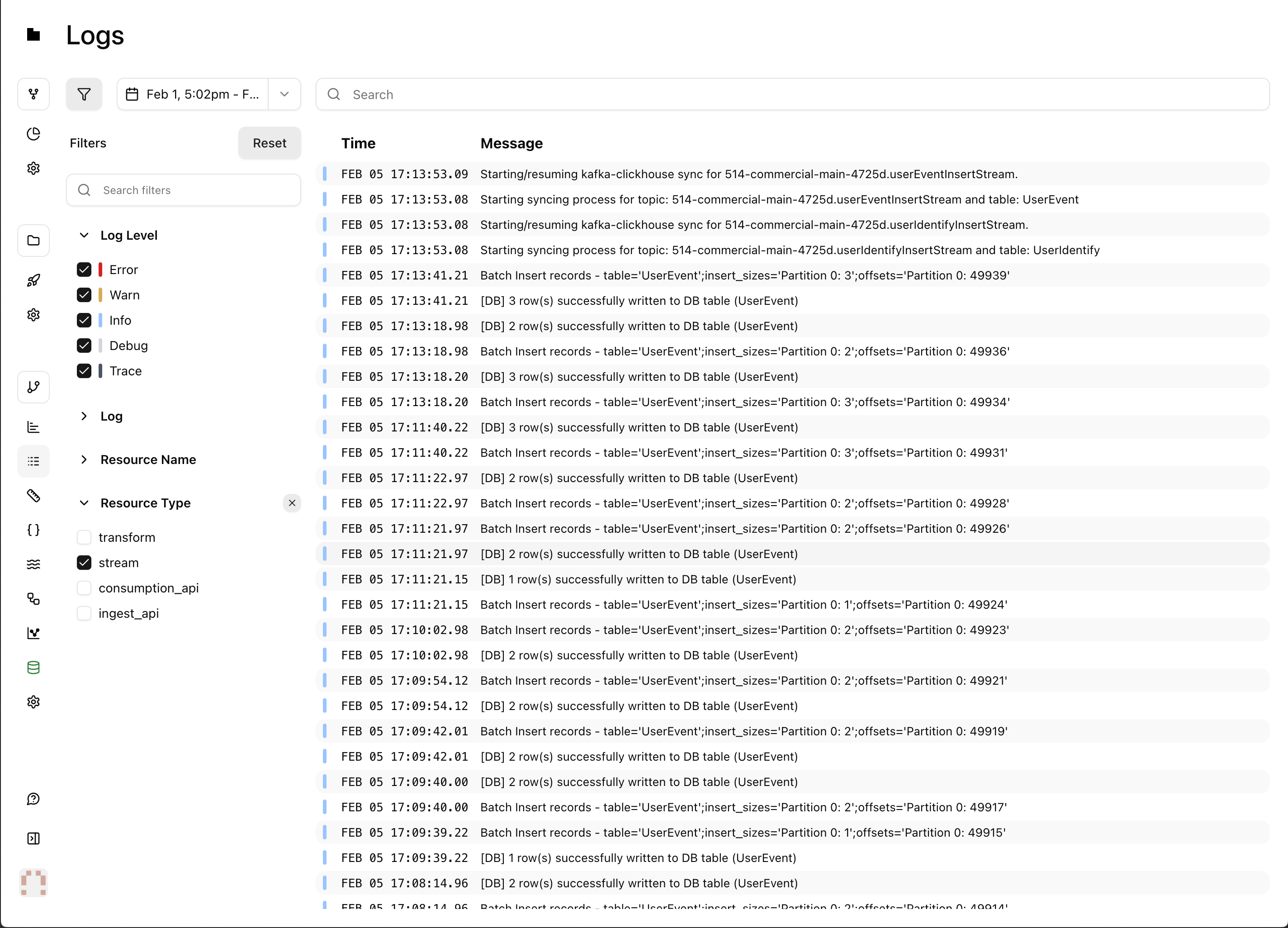
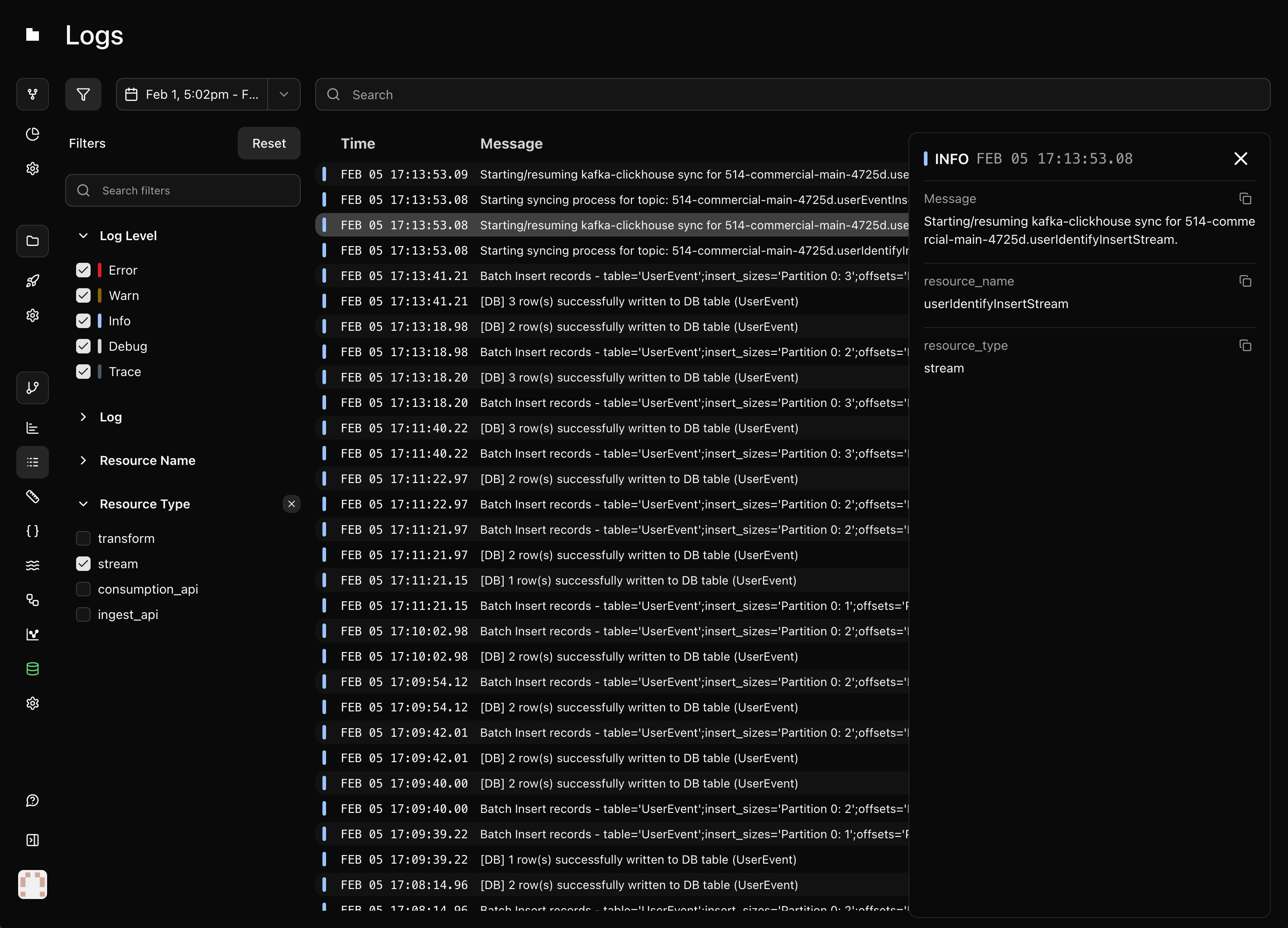
PR: #3446, #3447, #3425, #3433, #3424
Track Moose CLI versions in deployments (@LucioFranco) Deployments now track and display the Moose CLI version used to build them, making it easier to troubleshoot version-related issues.
Streamlined project creation with one-click deployment (@groy-514) Redesigned project creation flow with a multi-step wizard covering repository selection, data services configuration, and deployment settings. Supports both GitHub repository imports and template-based deployments.
Improvements
- Skip building projects with no relevant changes in PRs, reducing unnecessary build times. (@onelesd)
- Strip ANSI color codes from deployed application logs for cleaner readability in the dashboard. (@LucioFranco)
- Update moose to 0.6.362. (@LucioFranco)
- Replace old logs interface with the new structured logs system. (@groy-514)
- Organize command center into groups with drill-down navigation, add a "New Project" command, and show command counts. (@groy-514)
Bug Fixes
- Temporarily disable one-click deploy for the TypeScript MCP template. PR: #3442 (@onelesd)
- Fix validation and type handling in environment variable management that could cause errors when updating project configurations. (@georgevanderson)
Moose
⚠️ Breaking Changes
Move workflow routes behind admin authentication (@DatGuyJonathan)
Workflow trigger, history, and terminate endpoints have moved under /admin/ and now require a bearer token. Authentication is enforced in both dev and production modes.
Migration example
// Beforefetch('http://localhost:4000/workflows/my-pipeline/trigger', { method: 'POST', body: JSON.stringify(data)}); // After — all workflow routes require admin authconst ADMIN_TOKEN = process.env.MOOSE_ADMIN_TOKEN; fetch('http://localhost:4000/admin/workflows/my-pipeline/trigger', { method: 'POST', headers: { 'Authorization': `Bearer ${ADMIN_TOKEN}`, 'Content-Type': 'application/json' }, body: JSON.stringify(data)}); // History endpoint also movedfetch('http://localhost:4000/admin/workflows/history', { headers: { 'Authorization': `Bearer ${ADMIN_TOKEN}` }});PR: #3432 | Docs: /moosestack/workflows
New Features
Language Server documentation for IDE integration (@onelesd)
New docs page covering the MooseStack Language Server, which provides ClickHouse SQL intelligence (syntax validation, auto-completions, hover docs, formatting) for sql tagged template literals in TypeScript projects.
PR: #3453 | Docs: /moosestack/language-server
Feedback command for submitting issues and joining community (@oatsandsugar)
New moose feedback command with three modes:
moose feedback "message"— sends feedback directly via telemetrymoose feedback --bug "description"— opens GitHub Issues pre-filled with environment info and log pathsmoose feedback --community— opens Slack community invite
PR: #3462
Improvements
- Reorganize
moose --helpoutput with grouped commands and links to docs, community, and hosting. PR: #3461 | Docs: /moosestack/moose-cli (@oatsandsugar) - Clarify ClickPipes CDC section in the performant dashboards guide with better structure and scenario-specific callouts. PR: #3451 | Docs: /guides/performant-dashboards (@okane16)
- Improve performant dashboards guide with interactive configuration options and step-by-step Fiveonefour deployment instructions. PR: #3441 | Docs: /guides/performant-dashboards (@okane16)
- Add PDF API endpoint documentation to the static report generation guide, including WebApp-based PDF generation with binary responses. PR: #3407 | Docs: /guides/static-report-generation (@cjus)
- Skip Temporal connection attempts when workflows are disabled, reducing startup time. PR: #3436 | Docs: /moosestack/workflows (@LucioFranco)
- Add reusable MCP install instructions shared across guides. PR: #3419 | Docs: /guides/performant-dashboards (@okane16)
- Auto-detect CI/CD environments for improved behavior and diagnostics in automated pipelines. PR: #3411, #3450 (@callicles)
- Add table existence check and drop utilities to the ClickHouse client. PR: #3422 (@callicles)
- Add remote ClickHouse connection utilities with HTTP protocol support. PR: #3423 (@callicles)
Bug Fixes
- Fix SQL parser incorrectly treating column names containing "engine" as ENGINE clauses in CREATE TABLE statements. PR: #3440 (@callicles)
- Fix incorrect resource name generation for OLAP tables. PR: #3448 (@LucioFranco)